Creative Freedom: Bunny Brush Stamps for Procreate
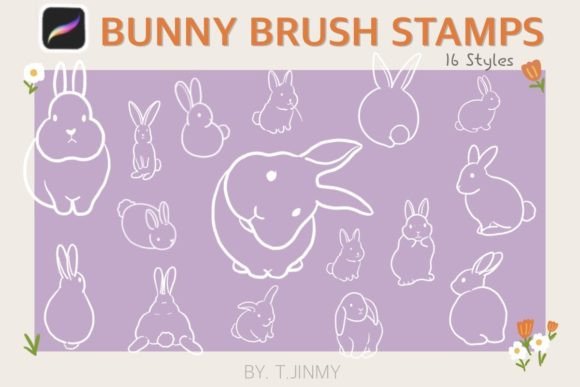
There is a specific kind of creative energy that comes from hand-drawn elements. Unlike rigid vector graphics, hand-drawn assets carry the subtle imperfections and organic flow that give digital designs a human touch. The Bunny Brush Stamps collection is built on this principle. Comprising 16 individual stamps, this set was hand-drawn directly within Procreate to ensure authentic texture and line quality. For designers, content creators, and hobbyists, these brushes offer a way to inject personality into projects ranging from seasonal branding to everyday stationery design.
Visual Characteristics and Style
The appeal of these Bunny Brush Stamps lies in their versatility. They are not monolithic; the set includes a variety of poses and expressions, allowing you to mix and match to create unique compositions. Whether you need a playful mascot for a children’s brand or a sophisticated motif for a boutique packaging design, the visual weight of these stamps can be adjusted to fit the context.
Because they were created as stamp brushes rather than static PNGs, they function as dynamic design assets. You have complete control over the scale, rotation, and color. This flexibility means you can use them as subtle background textures in web design or as bold, oversized focal points in social media graphics. The texture retains the look of a real brush stroke, which pairs exceptionally well with both script fonts and clean sans serif fonts, bridging the gap between organic illustration and modern typography.
Integrating into Brand Identity
When building a brand identity, consistency is key. However, consistency does not mean rigidity. Using the Bunny Brush Stamps allows you to create a cohesive visual language that feels approachable and artisanal. For small business owners, particularly those in the handmade goods, bakery, or boutique clothing sectors, these stamps can serve as a recurring visual motif.
Consider how you might use them in packaging design. A subtle stamp impression on a tissue paper background or a bold usage on a shipping box creates a memorable unboxing experience. In editorial design, such as digital magazines or blog headers, these elements break up the monotony of text-heavy layouts, improving visual hierarchy and keeping the reader engaged. They work best when you treat them as complementary elements to your primary typeface, ensuring that the typography remains legible while the illustrations add charm.
Practical Application in Procreate
To get the most out of these assets, you need to understand the technical workflow. Bunny Brush Stamps are designed exclusively for the iPad and Apple Pencil ecosystem within the Procreate app. They do not function in Photoshop or other desktop software, which is actually an advantage for mobile-first creators. This specificity ensures that the pressure sensitivity and rendering engine of Procreate are utilized perfectly.
The workflow is straightforward. Once you download the ZIP file, you must unzip it on your iPad. From there, the files can be shared directly into Procreate. A common stumbling block for users is forgetting to unzip the file before attempting to import. If the "Open in Procreate" option does not appear immediately in the share sheet, tapping "More" will reveal the option. Once imported, the stamps appear in your brush library, ready to be stamped onto your canvas.
Customization and Flexibility
The real power of using Bunny Brush Stamps comes from the customization options within Procreate. Because they are brushes, you are not locked into a specific color or size. You can recolor them to match specific hex codes from your brand identity palette.
Furthermore, you can adjust the opacity. A high-opacity stamp creates a solid, graphic look suitable for logos or icons. Lowering the opacity allows you to create watercolor-style backgrounds or subtle textures for website headers. You can also layer multiple stamps to create complex scenes or patterns. This ability to scale and transform the brushes means a single set of 16 stamps offers infinite variations, making it a highly efficient asset for professional designers and hobbyists alike.
Project Suitability and Creative Uses
Determining where to use these brushes depends on your project goals. They are particularly effective for:
- Logo Design: Creating unique, illustrated logos for brands that want an organic, handmade aesthetic.
- Social Media Graphics: Designing eye-catching Instagram stories, Pinterest pins, or Facebook headers that stand out in a crowded feed.
- Digital Planners: Adding decorative elements to digital planners or bullet journals for personal use or sale on marketplaces like Etsy.
- Merchandise: Designing graphics for t-shirts, mugs, or tote bags where a hand-drawn style is preferred over standard clipart.
For marketers, these stamps offer a way to soften corporate messaging. Using hand-drawn elements in presentations or internal communications can make content feel less sterile and more relatable. For publishers, they provide quick illustration options for blog posts or newsletters without the need to commission custom artwork for every piece of content.
Evaluating Fit and Pairing
When incorporating Bunny Brush Stamps into a design, evaluate the visual balance. If your primary typography is a heavy, bold display font, you might want to use the stamps at a smaller scale to avoid visual competition. Conversely, if you are using a delicate serif font or handwritten font, the stamps can be scaled up to act as anchor points in your layout.
Test your font pairing by placing the stamps next to your text layers. Ensure there is enough negative space so the design does not feel cluttered. The goal is to enhance readability, not hinder it. By treating these stamps as flexible creative fonts