Ignite Your Art with Fire Procreate Brushes
A Designer's Shortcut to Realistic Flame Effects
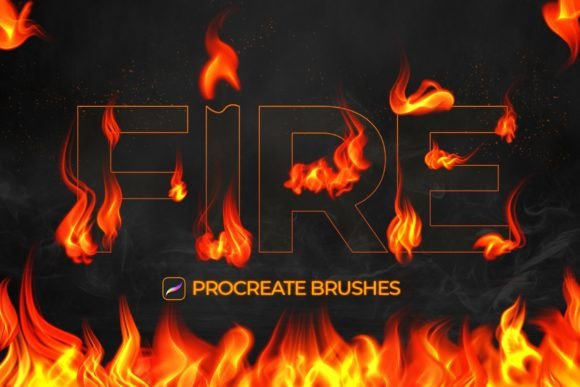
Adding a touch of fire to a digital illustration, a social media post, or a brand asset used to be a tedious process. It often involved layering multiple stock images, wrestling with blend modes, and spending hours on masking and color correction to achieve a halfway believable result. For creators working within Procreate, that workflow has been completely reinvented. A specialized set of Fire Procreate Brushes offers a direct, intuitive path to creating stunning, realistic flame effects with just a few strokes of your Apple Pencil.
This isn't just a simple stamp or a static shape. The collection of 12 different flame effects is engineered for dynamic creation. Each brush responds to the pressure and speed of your touch, allowing you to build complex, layered fire scenes. A light touch can produce a delicate wisp of smoke or a small candle flame, while applying more pressure delivers a thick, roaring inferno. This pressure sensitivity is the core of what makes these tools so powerful for digital artists, designers, and content creators. The result is fire that feels alive, integrated, and genuinely part of your artwork, not just pasted on top.
More Than Just Orange: The Power of Colorful Fire
One of the most compelling features of this brush set is its versatility with color. While realistic orange and red flames are just a brush stroke away, the true creative potential unlocks when you start experimenting. The brushes are designed to work with different colors, allowing you to generate everything from ethereal blue magical flames to vibrant green chemical fires or even a soft, pinkish glow for a fantasy-themed piece.
This capability transforms the brushes from a niche tool into a versatile component of your broader design assets library. Consider the applications:
- Social Media Graphics: Create eye-catching posts and stories for a product launch, a podcast episode about a "hot topic," or a festive holiday sale. A colorful flame effect can instantly grab attention in a crowded feed.
- Branding and Marketing: For a brand in the energy, sports, or entertainment sector, a stylized fire element can add a dynamic edge to logos, promotional banners, and video thumbnails. It helps build a brand identity that is energetic and bold.
- Digital Illustration and Concept Art: Whether you're designing a spell-casting character for a game or adding dramatic lighting to a poster, these brushes provide an efficient way to render complex light sources and effects.
- Editorial and Packaging Design: Imagine a magazine cover with a subtle, elegant flame trailing from a headline, or a hot sauce label with a fiery burst that looks hand-painted. These brushes can add that unique, artisanal quality that elevates a design from good to great.
The ability to simply brush over and get a realistic fire effect streamlines the creative process. Instead of searching for the right stock asset, you are creating a custom, perfectly integrated element directly on your canvas.
Integrating Fire into Your Creative Workflow
As a professional, your time is valuable. The practicality of the Fire Procreate Brushes lies in their simplicity. The set includes 12 Procreate Brushes, each offering a different fire effect, from roaring bonfires and contained campfires to wispy embers and explosive bursts. This variety ensures you have the right tool for any mood or context.
When incorporating these effects into your projects, keep a few practical tips in mind:
- Layering is Key: Don't try to create a complex fire scene on a single layer. Use separate layers for the core flame, the outer glow, and any smoke or embers. This gives you maximum control over color, opacity, and blending.
- Use a Blending Brush: After applying the fire, use a soft airbrush or a smudge tool on a low setting to gently blend the edges of the flame into the background. This helps it feel more natural and less like a digital sticker.
- Consider the Light Source: Fire is a light source. Remember to add subtle orange or yellow highlights to the surfaces near the flame to create a cohesive and believable scene.
- Color Adjustments: After painting your fire, use Procreate’s adjustments like Hue, Saturation, and Brightness to fine-tune the color to perfectly match your overall palette.
It is crucial to remember that this is a specialized creative font in the world of digital tools, but for a specific application. These brushes are designed exclusively for the Procreate application for Apple iPad. They leverage the unique capabilities of the iPad and Apple Pencil and are not compatible with other software like Adobe Photoshop. This focus is a strength, as it allows the brushes to be perfectly optimized for a seamless, lag-free experience within their native environment.
Ultimately, the Fire Procreate Brushes set is less about the tool itself and more about the creative doors it opens. It empowers you to add a powerful, symbolic element to your work with an ease that was previously unavailable. For designers, entrepreneurs, and creators looking to add a spark of energy, drama, or magic to their digital projects, this is an indispensable addition to your Procreate toolkit.