Unleash Your Creativity with the Ultimate Procreate Brush Bundle
As a designer, I know the feeling: you open Procreate, ready to bring a vision to life, but the default brushes just don't capture the specific texture, pattern, or stamp you need. You end up spending an hour searching for a single brush or spending money on tiny packs that don't quite work together. This is the exact problem the Mega Brush Bundle for Procreate was built to solve. It’s not just a collection of tools; it’s a comprehensive creative toolkit designed to eliminate friction and let you focus on making art.
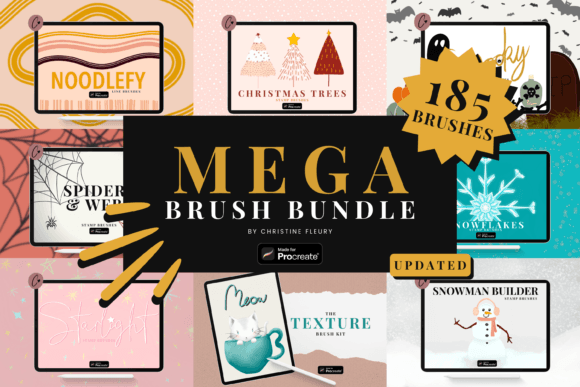
Imagine having immediate access to 185 brushes and stamps, all neatly organized and ready to use. This bundle is about giving you the power to decorate, color, add intricate texture, and apply unique patterns without ever leaving your canvas. It’s about building your own visual language, whether you're designing a seasonal card, crafting a social media post, or developing assets for your small business. The variety here is the real strength—it’s a single import that unlocks hundreds of creative possibilities.
What’s Inside: A Toolkit for Every Season and Project
The value of the Mega Brush Bundle for Procreate lies in its curated range. This isn't a random assortment; each set is designed to complement the others, giving you a cohesive toolkit for a wide array of projects. Let's break down what you receive and how you can use it.
- Thematic Stamp Collections: The bundle includes dedicated sets like Snowman Builder Brushes, Snowflake Stamp Brushes, Christmas Tree Stamp Brushes, and Starlight Stamp Brushes. These are perfect for holiday branding, seasonal marketing materials, festive invitations, and personal craft projects. Instead of drawing each snowflake from scratch, you can stamp beautiful, consistent designs instantly.
- Spooky & Seasonal Elements: The Spooky Stamp Brushes and Spider and Webs Stamp Brushes are invaluable for Halloween-themed designs, but their utility extends further. Use them for edgy poster designs, themed packaging, or unique social media graphics that need a touch of whimsy or drama.
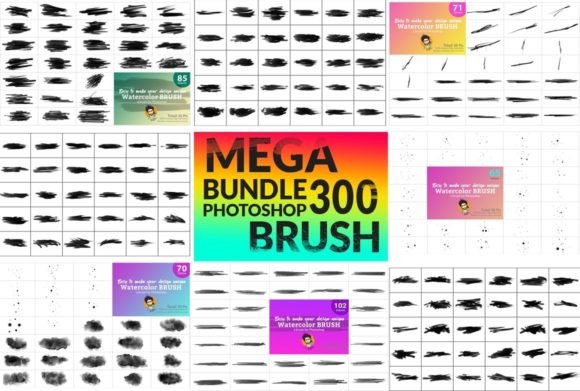
- Essential Texture & Pattern Brushes: The Texture Brush Kit for Procreate is a workhorse. It allows you to add depth, grain, and organic feel to your illustrations and backgrounds. Texture is a key element in modern typography and brand identity—it adds a layer of professionalism and tactile quality to digital work.
- Specialty Lettering & Line Art: The Shadow Lettering Brushes are a game-changer for creating impactful headlines and quotes with built-in dimension. The Noodlefy Line Brushes offer a unique, playful line quality that can make illustrations and borders stand out. These are not just decorative; they are tools for building visual hierarchy in your designs.
The beauty of this premium font equivalent in brush form is its ease of use. You receive the files in .brushset + .brush format, specifically optimized for Procreate. A single import loads all 185 brushes into your library, neatly labeled and ready to go. This saves you from the chaos of managing dozens of separate downloads and installations.
Real-World Applications: Where This Bundle Shines
Understanding the tools is one thing; knowing where to apply them is what truly enhances your workflow. The Mega Brush Bundle for Procreate is versatile, fitting seamlessly into professional and personal projects alike.
For Branding & Marketing: Consistency is the cornerstone of brand identity. Use the texture brushes to develop a signature background style for your social media graphics. The thematic stamps allow you to create seasonal campaigns quickly—think branded holiday posts, sale announcements, or event flyers—without compromising on a unique look. The shadow lettering brushes can add punch to promotional headlines, making your messaging more engaging.
For Publishing & Editorial Design: Whether you're designing a book cover, a magazine layout, or a blog header, texture and pattern are your allies. The Texture Brush Kit can add a vintage paper feel or a modern grain to your compositions. The stamp collections can serve as decorative elements in chapter headings or section dividers, adding personality to your editorial design without relying solely on serif or sans serif fonts.
For Digital Products & Craft: Entrepreneurs and crafters will find immense value here. Design unique digital planners, printable wall art, or custom greeting cards. The ability to quickly add intricate snowflakes, trees, or spooky elements means you can produce a professional product line efficiently. This bundle acts as a foundational set of design assets, reducing the need to purchase individual elements for every new project.
For Personal Art & Hobbyists: This is where the fun really begins. The Mega Brush Bundle for Procreate lowers the barrier to creating beautiful, complex art. You can build a snowman scene with the builder brushes, add a textured background, frame it with noodlefy lines, and add a custom message with shadow lettering—all within one app. It’s about empowering your creativity, not limiting it to what you can draw freehand.
Practical Guidance for Seamless Integration
To get the most out of this toolkit, a little strategy goes a long way. Here’s how to evaluate and integrate these brushes into your creative process.
- Assess Your Project Needs: Before diving in, consider the style you're aiming for. Are you creating a logo design that needs clean, scalable stamps? Or a textured illustration for a packaging design? The bundle covers a wide range, but focusing your initial exploration on the relevant brush sets (e.g., starting with the texture kit for a gritty poster) will streamline your work.
- Experiment with Combinations: The real magic happens when you layer. Use a texture brush on a background layer, stamp a pattern with reduced opacity, and then add your main illustration or lettering on top. Try recoloring the stamps—change a red Christmas tree to a metallic gold to fit a luxury brand aesthetic. The recolor, size, and opacity controls are your best friends for customization.
- Test for Readability and Hierarchy: When using the Shadow Lettering Brushes, remember that they are a display font style tool. They excel in headlines and short bursts of text, not body copy. Pair them with a simple sans serif font for clean, readable supporting text. This contrast creates a strong visual hierarchy, guiding the viewer's eye effectively.
- Understand the Format: This is a critical technical note. The bundle requires Procreate version 5 or higher to install the .brushset file. Ensure your app is updated. The .brush files are the individual brush components. The entire system is designed for the Procreate ecosystem on iPad, so it’s not a commercial font for desktop software like Adobe Illustrator, but a specialized digital art toolkit.
- Leverage for Efficiency: For small business owners and content creators, time is a resource. Having this bundle means you can respond quickly to trends. A sudden need for a "cozy autumn" Instagram post? Pull out the texture brushes and relevant stamps. A client request for a Halloween-themed menu? The spooky stamps are ready. This agility is a significant professional advantage.
In essence, the Mega Brush Bundle for Procreate is more than a collection of digital tools. It’s a pathway to more confident, efficient, and expressive creation. It respects the fact that great design often comes from the thoughtful combination of elements—texture, pattern, form, and type. By providing a vast, organized, and easy-to-use library, it removes technical hurdles and lets you, the creator, focus on what matters: bringing your unique vision to the canvas. Whether you're a seasoned designer building a brand identity or a hobbyist exploring digital art, this bundle is a solid investment in your creative toolkit.