Let's Art Lettering Brushes: A Creative Toolkit for Procreate
More Than Just Brushes: A System for Authentic Hand Lettering
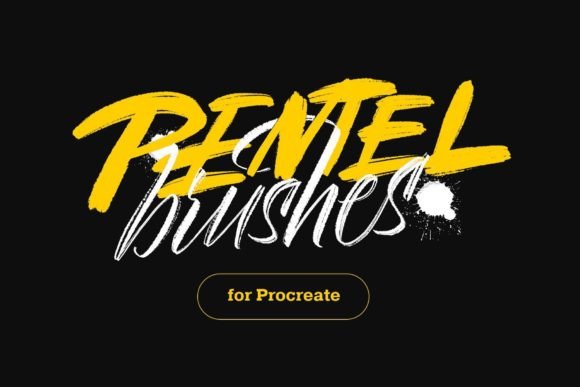
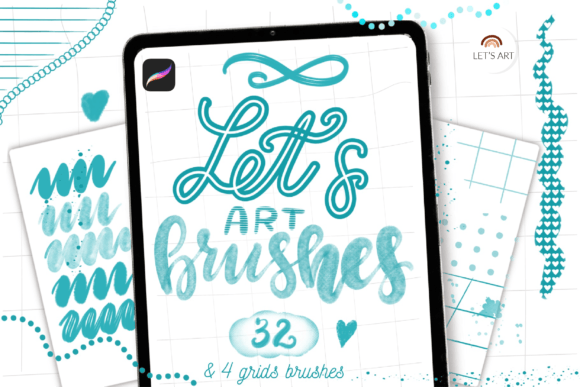
When you open the Let's Art Lettering Brushes brushset in Procreate, the first thing you notice is the variety. This isn't a single style; it's a curated collection of 32 distinct brushes, each designed to mimic the feel and texture of a specific traditional lettering tool. You get brushpen brushes that have a satisfying, responsive pressure curve, perfect for building up stroke weight in a single motion. There are watercolor brushes that bleed and blend with a soft, organic quality, ideal for creating backgrounds or adding a painterly touch to your typography. The set also includes textured brushes for that gritty, vintage feel, stripe brushes for decorative patterns, and a chalk brush that’s perfect for creating designs on dark backgrounds with a soft, powdery edge.
The personality of Let's Art Lettering Brushes is grounded in realism. These aren't overly digital or sterile. A dotted line brush adds playful emphasis, a foggy brush creates subtle atmospheric depth, and the decorative brushes offer flourishes and accents that feel hand-drawn. This collection understands that great lettering is often about imperfection and character. The bonus items—four lettering grid brushes and two color palettes—are practical additions. The grids provide a structural foundation for consistent letterforms, while the palettes offer harmonious color schemes to jumpstart your creative process.
Where This Lettering Set Truly Shines
The real-world value of a tool like this is measured by its application. For designers and brand strategists, Let's Art Lettering Brushes is a powerful asset for creating a distinct brand identity. Imagine crafting a logo for a boutique coffee shop or a craft brewery. Using the brushpen brushes, you can develop a wordmark that feels artisanal and human, immediately differentiating it from generic corporate fonts. This handwritten font style builds an emotional connection, signaling authenticity and care. For packaging design, the textured and watercolor brushes can create labels that jump off the shelf with tactile appeal, telling a story before the customer even reads the product name.
For content creators, marketers, and social media managers, the applications are equally impactful. A striking Instagram quote or a Pinterest pin created with the chalk brush on a dark background stops the scroll. The ability to quickly generate eye-catching social media graphics with a cohesive, handcrafted feel strengthens brand recognition. Bloggers and publishers can use these brushes for chapter headings, pull quotes, or cover designs in digital magazines and ebooks, adding a layer of editorial design sophistication that stands out. The key is using this creative font as a display element—a headline, a logo, a short phrase—where its character can be fully appreciated, rather than for long blocks of body text where readability might suffer.
Practical Guidance for Integrating These Tools
Choosing the right brush from the set is your first practical step. Evaluate your project's needs. Is it a rustic, vintage theme? The textured brushes are your go-to. A modern, clean event invitation? The brushpen brushes with their controlled strokes might be perfect. For a playful, child-oriented design, explore the decorative and dotted line options. Testing is non-negotiable. Open a new Procreate canvas and simply write the alphabet with each brush. Feel how the pressure sensitivity responds. See how the edges behave. This hands-on evaluation is far more valuable than just looking at a preview sheet.
Font pairing is another critical consideration. A bold, textured handwritten font like those created with these brushes pairs beautifully with a clean, simple sans serif font. For example, use a Let's Art brush for a main headline and a font like Montserrat or Open Sans for subheadings and body copy. This creates clear visual hierarchy and ensures your message remains readable. The included lettering grids are invaluable here, helping you maintain consistent letter spacing and baseline alignment, which is essential for professionalism, even in a script font style.
Installation and Compatibility Note
It's important to note that the .brushset file is designed for Procreate version 4.1 or later. If you're using an older iPad or Procreate version 4.0 or earlier, you'll need to install the individual .brush files manually. The process is straightforward: download the .brush files to your iPad, navigate to them in the Files app, tap and hold, choose "Share," and then select "Open in Procreate." Alternatively, within Procreate itself, you can create a new brush collection, tap "Import," and locate your downloaded files. This ensures everyone can access these design assets, regardless of their specific software version.
Finally, consider the commercial potential. These are professional-grade tools suitable for client work, merchandise, and product design. Always review the specific license details included with your purchase, but a high-quality set like this is typically crafted with commercial use in mind. It’s an investment in your creative toolkit that can elevate projects across digital and print, helping you produce work that feels unique, engaging, and authentically crafted. Let's Art Lettering Brushes provides the variety and quality to make that happen.